
Checklists & RFIs
Working with compliance checklists and Requests for Information
Checklists & RFIs
The checklist is the heart of compliance assessment. It contains all the items that must be verified before a building permit can be issued.
Checklist Items Tab
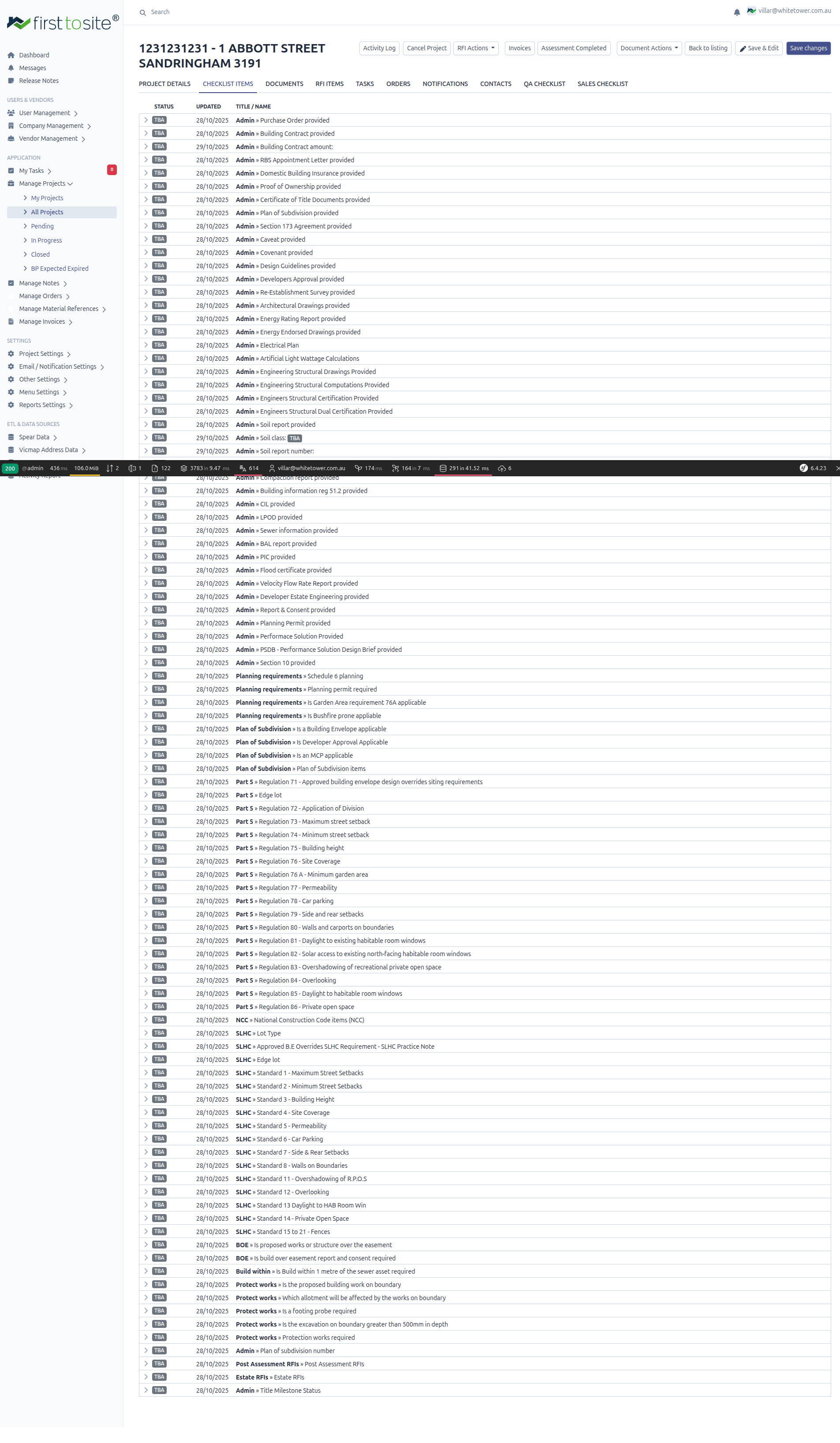
Open any project and click the CHECKLIST ITEMS tab to see the compliance checklist.
Checklist Structure
The checklist is organized into categories with expandable items:
| Column | Description |
|---|---|
| Expand arrow | Click to see item details and RFIs |
| STATUS | Current status badge (TBA, etc.) |
| UPDATED | Last modification date |
| TITLE / NAME | Category and item description |
Checklist Categories
Checklist items are grouped by category:
Admin Items
Core administrative requirements:
- Purchase Order provided
- Building Contract provided
- Building Contract amount
- RBS Appointment Letter provided
- Domestic Building Insurance provided
- Proof of Ownership provided
- Certificate of Title Documents provided
- Plan of Subdivision provided
- Section 173 Agreement provided
- Caveat provided
- Design Guidelines provided
- Developers Approval provided
- Re-Establishment Survey provided
- Architectural Drawings provided
- Energy Rating Report provided
- Energy Endorsed Drawings provided
- Electrical Plan
- Artificial Light Wattage Calculations
- Engineering Structural Drawings Provided
- Engineering Structural Computations Provided
- Engineers Structural Certification Provided
- Engineers Structural Dual Certification Provided
- Soil report provided
- Soil class
- Soil report number
- Compaction report provided
- Building information reg 5.1.2 provided
- CIL provided
- LPOD provided
- Sewer information provided
- BAL report provided
- PIC provided
- Flood certificate provided
- Velocity Flow Rate Report provided
- Developer Estate Engineering provided
- Report & Consent provided
- Planning Permit provided
- Performance Solution Provided
- PSDB - Performance Solution Design Brief provided
- Section 10 provided
- Plan of subdivision number
Planning Requirements
Planning and zoning compliance:
- Schedule 6 planning
- Planning permit required
- Is Garden Area requirement 76A applicable
- Is BushFire prone applicable
Plan of Subdivision
Subdivision-related checks:
- Is a Building Envelope applicable
- Is Developer Approval Applicable
- Is an MCP applicable
- Plan of Subdivision items
Part 5 Regulations
Building regulations compliance (Part 5):
- Regulation 71 - Approved building envelope design overrides using requirements
- Regulation 72 - Application of Division
- Regulation 73 - Maximum street setback
- Regulation 74 - Minimum street setback
- Regulation 75 - Building height
- Regulation 76 - Site Coverage
- Regulation 76 A - Minimum garden area
- Regulation 77 - Permeability
- Regulation 78 - Car parking
- Regulation 79 - Side and rear setbacks
- Regulation 80 - Walls and carports on boundaries
- Regulation 81 - Daylight to existing habitable room windows
- Regulation 82 - Solar access to existing north-facing habitable room windows
- Regulation 83 - Overshadowing of recreational private open space
- Regulation 84 - Overlooking
- Regulation 85 - Daylight to habitable room windows
- Regulation 86 - Private open space
NCC (National Construction Code)
- National Construction Code Items (NCC)
SLHC (Small Lot Housing Code)
For lots under 300 sqm:
- Lot Type
- Approved B.E Overrides SLHC Requirement - SLHC Practice Note
- Edge lot
- Standard 1 - Maximum Street Setbacks
- Standard 2 - Minimum Street Setbacks
- Standard 3 - Building Height
- Standard 4 - Site Coverage
- Standard 5 - Permeability
- Standard 6 - Car Parking
- Standard 7 - Side & Rear Setbacks
- Standard 8 - Walls on Boundaries
- Standard 11 - Overshadowing of N.R.P.O.S
- Standard 12 - Overlooking
- Standard 13 Daylight to HAB Room Win
- Standard 14 - Private Open Space
- Standard 15 to 21 - Fences
BOE (Build Over Easement)
- Is proposed works or structure over the easement
- Is build over easement report and consent required
Build Within & Protect Works
- Is Build within 1 metre of the sewer asset required
- Is the proposed building work on boundary
- Which allotment will be affected by the works on boundary
- Is a Footing probe required
- Is the excavation on boundary greater than 500mm in depth
- Protection works required
RFI Categories
- Post Assessment RFIs
- Estate RFIs
- Title Milestone Status
Item Statuses
| Status | Meaning |
|---|---|
| TBA | To Be Assessed - not yet reviewed |
| N/A | Not Applicable to this project |
| Compliant | Requirement satisfied |
| Non-Compliant | Fails requirement, needs resolution |
| Pending | Awaiting information or document |
Expanding Items
Click the > arrow next to any item to expand it and see:
- Full item description
- Current answer/value
- Related RFIs (Requests for Information)
- Notes and comments
- Linked documents
RFI Items Tab
The RFI ITEMS tab shows all Requests for Information for the project:
- RFIs sent to the customer requesting documents or clarification
- RFIs from vendors or authorities
- Status tracking (Sent, Received, Outstanding)
Working Through the Checklist
For Assessors
- Open the project's CHECKLIST ITEMS tab
- Expand each category
- Review each item against the submitted documents
- Set the status (Compliant, Non-Compliant, N/A)
- Add notes explaining your assessment
- Create RFIs for missing information
For Items Requiring Documents
- Check if the required document is uploaded
- Review the document content
- Mark as Compliant if requirements are met
- Create an RFI if document is missing or insufficient
For Calculation Items
Some items require calculations (setbacks, site coverage, etc.):
- Review the architectural drawings
- Perform or verify the calculation
- Record the measured value
- Compare against the requirement
- Mark Compliant or Non-Compliant
Creating RFIs
When information is missing:
- Expand the checklist item
- Click Add RFI
- Describe what information is needed
- Set priority and due date
- Save - the customer will be notified
RFI Actions
From the project header, click RFI Actions for:
- Send all outstanding RFIs
- Download RFI summary
- Mark RFIs as resolved
Assessment Completion
When all checklist items are reviewed:
- Verify no items are still TBA
- Resolve all Non-Compliant items
- Close outstanding RFIs
- Click Assessment Completed button
- The project status updates automatically
Downloading the Checklist
Click the Download checklist button on the Project Details tab to export the checklist as a document. This can be sent to customers or included in permit applications.
QA Checklist & Sales Checklist
Additional tabs provide specialized checklists:
- QA CHECKLIST - Quality assurance verification items
- SALES CHECKLIST - Sales-related tracking items
Tips
- Work top to bottom - Categories are ordered logically
- Use N/A liberally - Skip items that don't apply (e.g., SLHC items on large lots)
- Document your reasoning - Add notes for non-obvious assessments
- Link to documents - Associate checklist items with uploaded files
- Check regulations - Part 5 items reference specific building regulations
Next Steps
- Managing Documents - Upload required documents
- Working with Orders - Order missing reports
- Invoicing - Invoice based on completed work